Mastering Tailwind CSS: Senior Developer Best Practices for Enterprise Applications

Software Engineer
- #tailwindcss
- #css
- #frontend-development
- #design-systems
- #frontend-architecture
- #clean-code
- #web-performance
Step up your frontend architecture with enterprise-grade Tailwind CSS practices. Learn how senior developers manage class lists, design systems, and run-time dynamic theming.
Tailwind CSS has fundamentally changed how we build modern web interfaces. By shifting the paradigm from semantic stylesheets to utility-first styling, it has unlocked unprecedented speed and consistency. However, while a junior developer might look at Tailwind as a collection of convenient shorthand utilities to avoid writing CSS, a senior developer views Tailwind as a highly configurable, design-system-first compiler engine.
In enterprise-level applications, naive Tailwind usage rapidly degrades into a maintenance nightmare: thousands of un-sortable utility classes, fragmented layouts, broken accessibility, and uncontrolled visual regressions. To scale Tailwind to dozens of developers and large, evolving monorepos, you need to treat styling with the same architectural rigor as you would your application state. This masterclass dives deep into the patterns, tooling, and best practices required to write clean, maintainable, and highly performant Tailwind CSS at scale.
1. Architectural Foundation: Design Tokens & Custom Configuration
The core of any enterprise-grade application is a strict design system. A common junior mistake is bypassing the configuration file and relying on arbitrary values (e.g., bg-[#3A86C8] or w-[432px]) directly inside React, Vue, or Angular components. This breaks the single source of truth, making brand refactors or light/dark mode implementations nearly impossible.
Overriding vs. Extending the Theme
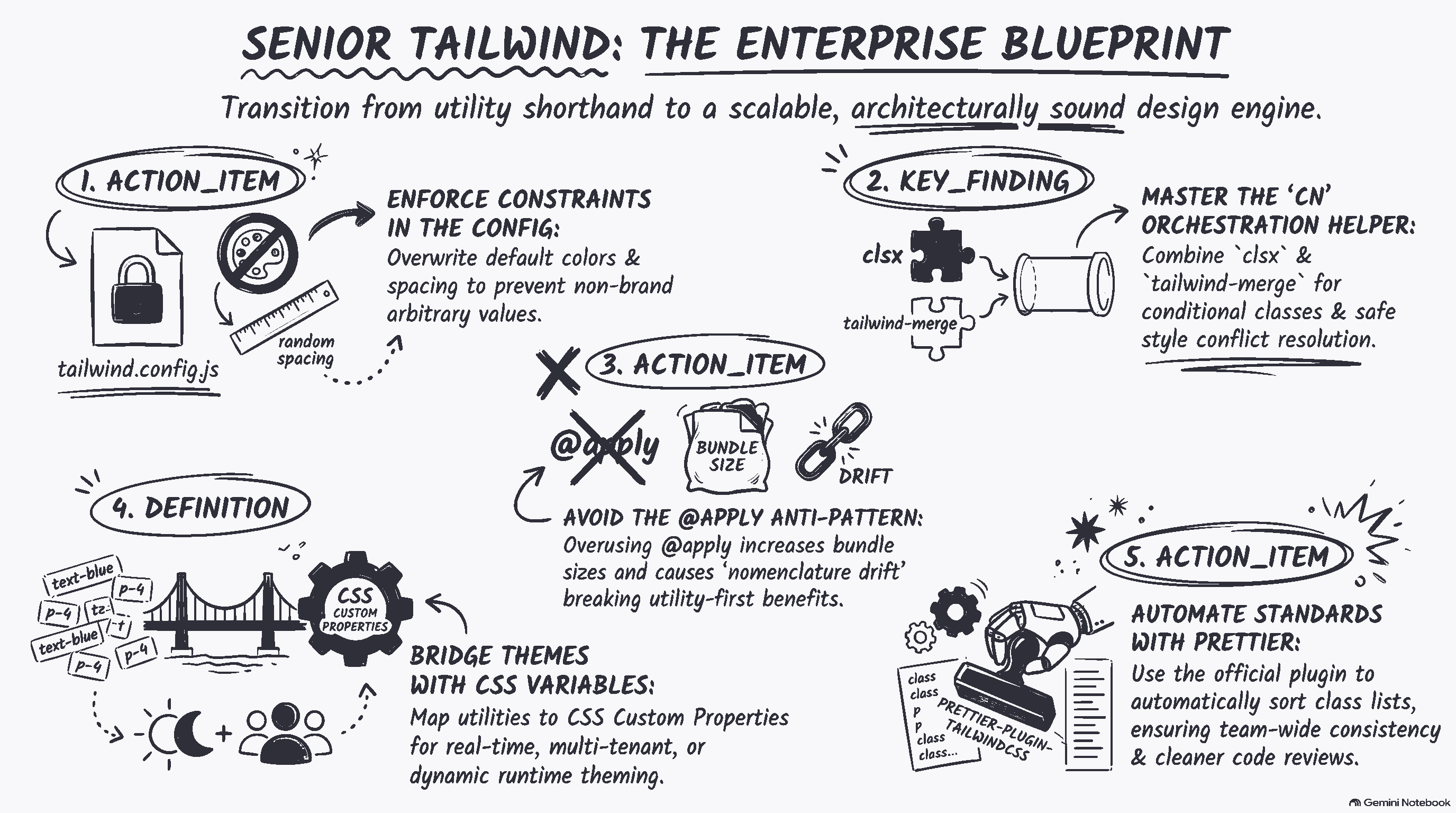
When setting up your tailwind.config.js, understand when to override and when to extend the default configurations. If your company has a bespoke brand identity, you should overwrite default values like colors and spacing entirely to prevent developers from accidentally using non-brand colors.
// tailwind.config.js
module.exports = {
  theme: {
    // Overwriting colors entirely prevents non-brand colors from polluting the codebase
    colors: {
      transparent: 'transparent',
      current: 'currentColor',
      white: '#FFFFFF',
      black: '#000000',
      brand: {
        50: '#F0F7FF',
        100: '#E0EFFF',
        500: '#1D4ED8',
        900: '#1E3A8A',
      },
      neutral: {
        100: '#F3F4F6',
        500: '#6B7280',
        900: '#111827',
      },
    },
    extend: {
      // Extend only when adding to existing utilities without breaking core layout patterns
      fontFamily: {
        sans: ['InterVar', 'sans-serif'],
      },
    },
  },
  plugins: [],
}
Enforcing Constraints with Linters
To ensure team compliance, rely on automated tooling rather than code review vigilance. Use the eslint-plugin-tailwindcss plugin. Configured correctly, it can throw build-time errors when arbitrary values are used where theme-defined variables are available, or warn developers when they violate structural rules.
"In enterprise design systems, constraints are features. Limiting choice reduces cognitive load and guarantees visual harmony across disparate product teams."
2. Class Orchestration: Managing the Utility Chaos
One of the most common complaints about Tailwind is "class-list bloating." When a complex element requires 20+ utility classes for responsive layouts, flexbox alignments, hover/focus interactions, and dark-mode alternatives, readability declines. Senior developers leverage standard class orchestration patterns to solve this.
Why You Should Avoid Naive String Concatenation
When dynamically applying classes based on state, naive template literals often result in messy, unreadable code. Even worse, they can lead to conditional classes overriding each other in unexpected ways because of CSS specificity.
Consider this problematic React component:
// Avoid this pattern
const Button = ({ variant, isActive }) => {
  return (
    <button className={`px-4 py-2 rounded-md ${variant === 'primary' ? 'bg-blue-500 text-white' : 'bg-gray-200'} ${isActive ? 'ring-2 ring-blue-300' : ''}`}>
      Click Me
    </button>
  );
}
The Modern Standard: clsx + tailwind-merge
To safely merge classes, senior developers combine clsx (for conditional formatting) with tailwind-merge (which intelligently resolves class conflicts by overriding left-to-right based on actual utility specificity, rather than source code order). Below is the industry-standard helper function used to orchestrate complex styling:
import { clsx } from "clsx";
import { twMerge } from "tailwind-merge";

// A reusable utility for enterprise apps
export function cn(...inputs) {
  return twMerge(clsx(inputs));
}
Applying cn in Component Variants
To build truly scalable, polymorphic UI components like custom buttons, alerts, or inputs, combine this helper with libraries like class-variance-authority (CVA). This decouples design variants from markup structure, bringing back the benefits of a structured design system with CSS modules, but powered under the hood by Tailwind.
import { cva } from "class-variance-authority";
import { cn } from "@/utils/cn";

const buttonVariants = cva(
  "inline-flex items-center justify-center rounded-md text-sm font-medium transition-colors focus-visible:outline-none focus-visible:ring-2 focus-visible:ring-offset-2 disabled:pointer-events-none disabled:opacity-50",
  {
    variants: {
      variant: {
        default: "bg-brand-500 text-white hover:bg-brand-600",
        destructive: "bg-red-600 text-white hover:bg-red-700",
        outline: "border border-neutral-300 bg-transparent hover:bg-neutral-100",
      },
      size: {
        default: "h-10 px-4 py-2",
        sm: "h-9 rounded-md px-3",
        lg: "h-11 rounded-md px-8",
      },
    },
    defaultVariants: {
      variant: "default",
      size: "default",
    },
  }
);

export function Button({ className, variant, size, ...props }) {
  return (
    <button
      className={cn(buttonVariants({ variant, size, className }))}
      {...props}
    />
  );
}
3. The Great Debate: Why Seniors Avoid Overusing @apply
It is incredibly tempting for developers migrating from traditional CSS/SASS to bundle Tailwind classes into semantic CSS declarations using Tailwind’s @apply directive. While this looks cleaner in your markup, it is widely considered an anti-pattern in enterprise systems for several key reasons:
Large Bundle Sizes:
@applyduplicates CSS rules. When you apply 20 classes to 5 different semantic custom selectors, Tailwind has to output the CSS rule declarations five times instead of purging and compiling single instances of utility classes in your final build.Maintenance Overhead: You are forced to jump back and forth between your HTML/JSX components and separate CSS stylesheets, entirely defeating the productivity benefit of utility-first architecture.
Nomenclature Drift: Developers fall back to inventing arbitrary, hard-to-maintain class names (e.g.,
.dashboard-left-sidebar-item-inner) instead of writing predictable UI elements.
The Rule of Thumb: Only use @apply if you absolutely have to override styles from external third-party CSS components, or when defining complex typography flow patterns via global stylesheets (like targeting arbitrary markdown inputs via the @tailwindcss/typography plugin).
4. Runtime Dynamic Theming & Multi-Tenant Solutions
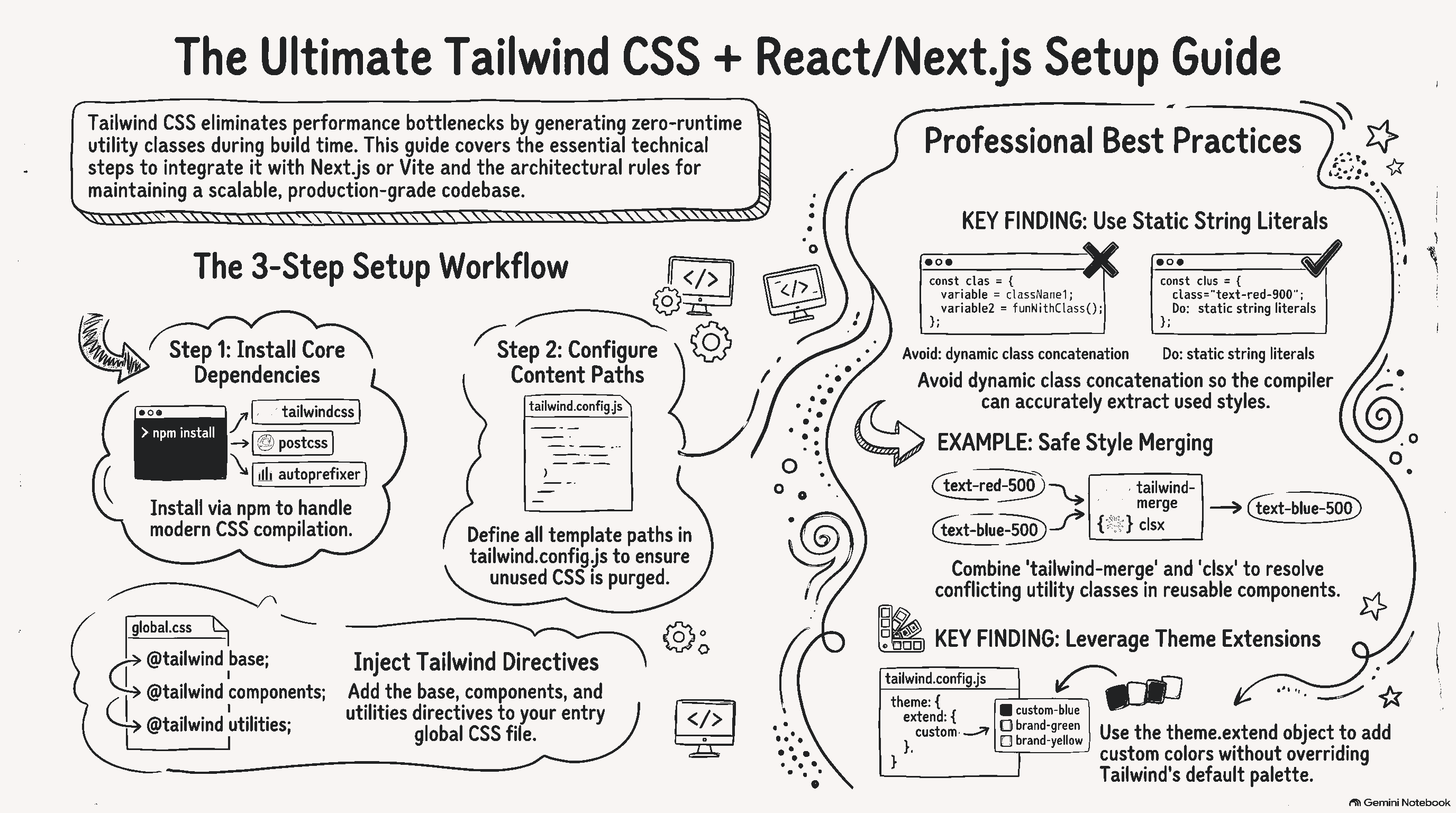
Large-scale corporate software often requires real-time customization, such as multi-tenant white-labeling, personalized dashboards, or dynamically toggling high-contrast/dark-mode styles. Because Tailwind relies on a build-time compiler to purge unused classes, generating classes dynamically via string concatenation (e.g., className={`bg-${color}-500`}) will fail because Tailwind's parser won't recognize those classes as "active" in your source file.
The CSS Custom Properties (Variables) Bridge
The solution is mapping your Tailwind config to CSS Custom Properties. Rather than dynamically generating utility class names, you dynamically assign values to standard CSS custom properties on your root HTML element, and configure Tailwind to consume those variables.
First, specify the custom variables in your primary CSS entry file:
:root {
  --color-primary: 29 78 216; /* RGB format allows Tailwind opacity modifiers to work */
  --color-secondary: 107 114 128;
}

[data-theme="dark"] {
  --color-primary: 30 58 138;
  --color-secondary: 17 24 39;
}
Then, configure your design system to pull these runtime CSS variables dynamically:
// tailwind.config.js
module.exports = {
  theme: {
    extend: {
      colors: {
        // The rgb wrapper supports opacity modifiers like bg-primary/50
        primary: 'rgb(var(--color-primary) / <alpha-value>)',
        secondary: 'rgb(var(--color-secondary) / <alpha-value>)',
      },
    },
  },
}
5. Enforcing Strict Performance Constraints & Layout Stability
To maintain high Google Lighthouse rankings, Core Web Vitals must remain perfect. In enterprise architectures, CSS must not block rendering, nor should it trigger cumulative layout shifts (CLS).
1. Prettier Class Sorting
Large teams writing arbitrary utilities in different orders causes code reviews to become unnecessarily tedious, and can lead to minor rendering differences because of different utility sequences. Use the official prettier-plugin-tailwindcss to automatically sort classes based on Tailwind’s internal recommended layout sequence (Layout, Box Model, Typography, Borders, Interactive, etc.) on save.
2. Optimize the Just-In-Time (JIT) Compilation Engine
Ensure that your content configuration targets your templates and components accurately. Broad wildcard paths like './**/*.{js,ts}' can cause the JIT compiler to search through massive directories like node_modules, dramatically slowing down dev server restarts and local build executions.
// Optimize production builds with fine-tuned content parsing paths
module.exports = {
  content: [
    "./apps/web/src/components/**/*.{js,ts,jsx,tsx}",
    "./apps/web/src/pages/**/*.{js,ts,jsx,tsx}",
    "./packages/shared-ui/components/**/*.{js,ts,jsx,tsx}",
  ],
  // ...
}
Summary: The Enterprise Developer's Tailwind Checklist
Scaling a utility-first styling system to dozens of production projects requires transforming how you write CSS. Here is your quick checklist for high-level operations:
Never concatenate full class names: Keep classes intact so the build-time compiler can locate them.
Use
cn(...)helpers: Pairclsxandtailwind-mergefor clean, reliable state-based condition merging.Leverage CVA: Decouple UI state mechanics from your design options to build predictable, multi-variant design systems.
Keep configurations rigid: Outsource layout and color constraints to
tailwind.config.jsinstead of relying on inline arbitrary styling strings.Sort with Prettier: Standardize visual flow formatting across teams with the official Prettier class sorting plugin automatically.