The Complete Guide to Next.js App Router (2026 Edition)

Software Engineer
- #nextjs
- #react
- #app-router
- #2026

Everything you need: file-based routing, layouts, Server vs Client Components, data fetching, and patterns that scale in 2026.
Ever felt confused about routing in Next.js? You’re not alone. Many developers struggle when they first encounter the modern Nextjs Router system, especially with the architectural shift introduced by the new App Router.
But here’s the good news: once you understand how the directory-based structure works, everything starts to feel structured, logical, and surprisingly powerful. In this comprehensive guide, we’ll break down the Nextjs Router step-by-step—exploring what it is, why it matters, and how you can implement it in real-world production environments.
Whether you're building a content-rich blog, a complex SaaS dashboard, or a dynamic e-commerce web application, this guide will provide the deep technical insights you need to build scalable, high-performing web applications.
What is Nextjs Routing?
Nextjs routing is a file-system based routing mechanism where folders in your project directory define your application's URLs. By mapping folder hierarchies directly to browser endpoints, the Nextjs Router eliminates the need for manual, complex third-party routing configurations.
For example, a typical project maps directories directly to matching endpoints:
/about → About Page
/contact → Contact Page
With the release of Next.js 13, the framework introduced the modernized Nextjs App Router built on React Server Components, offering advanced features like layouts, nested routes, and streaming out of the box. You can learn more about these foundational concepts from the Next.js Official Routing Docs.
Why the App Router is a Industry Game-Changer
The updated Nextjs Router (App Router) represents a major paradigm shift in how React applications render and deliver code to the browser.
According to web performance benchmarks and industry reports [1], adopting the App Router significantly reduces client-side JavaScript bundle sizes and improves Core Web Vitals.
- File-based routing with structural flexibility: Organize your code logically using folders, private folders, and route groups without affecting the final URL paths.
- Nested layouts: Easily share UI layouts across sub-routes to prevent unnecessary re-renders and preserve component state.
- React Server Components (RSC) by default: Fetch data directly on the server for faster initial page loads and improved SEO performance.
- Streaming and Suspense integration: Progressively render parts of your page to keep users engaged while slower data-fetching requests complete.
By moving layout configuration and data rendering closer to the server, the new router resolves the historical layout-management bottlenecks associated with the older Pages Router system.
Understanding Folder-Based Routing (Core Concept)
In the Nextjs App Router, your route structure is dictated entirely by how you organize your directories within the root app/ folder.
The entry point of any accessible route is always a file named page.js (or page.tsx for TypeScript projects) placed inside a specific folder nested under app/.
app/
  page.js        (Maps to: /)
  about/
    page.js      (Maps to: /about)
  contact/
    page.js      (Maps to: /contact)
This automated mapping means there is no central routing configuration file to maintain, which drastically reduces merge conflicts and overhead in large team environments.
Special Files in the Nextjs App Router
The Nextjs Router reserves specific file names to automatically handle key UI states and layout behaviors. Understanding these files is essential for designing professional, resilient user experiences.
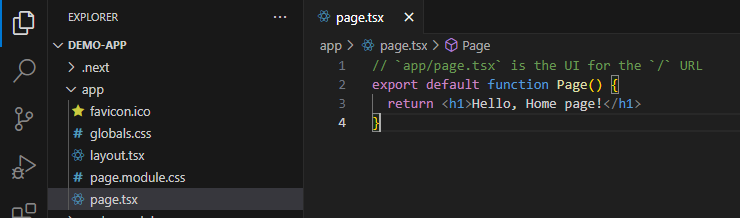
1. page.js
The page.js file defines the unique, publicly accessible UI for a specific route path. It acts as the core content block of your page.
2. layout.js
The layout.js file defines UI that is shared across multiple routes. It accepts a children prop and preserves state during navigation, preventing full page re-renders.
3. loading.js
The loading.js file leverages React Suspense to instantly display a loading fallback (like a skeleton screen) while the dynamic content of your route is being fetched on the server.
4. error.js
The error.js file establishes a localized error boundary for your route segments. If an unexpected runtime error occurs, this file isolates the crash to that specific section, allowing the rest of the application to remain interactive.
Nested Routing Explained
Nested routing allows you to construct complex hierarchies by nesting folders within other folders inside your project structure.
app/
  dashboard/
    page.js          (Maps to: /dashboard)
    settings/
      page.js        (Maps to: /dashboard/settings)
When users navigate within these nested structures, the Nextjs Router only re-renders the segments of the page that actually change. For instance, navigating from /dashboard to /dashboard/settings will keep your main dashboard sidebar layout completely intact while swapping out only the main nested content area.
Dynamic Routes (Handling Real-World Data)
Dynamic routing enables you to match dynamic URL parameters (such as slugs, IDs, or usernames) by wrapping folder names in square brackets.
For example, to handle dynamic blog posts, you structure your directories as follows:
app/blog/[slug]/page.jsThis pattern dynamically captures any path parameter and resolves URLs like:
/blog/nextjs-guide/blog/react-tips
Inside your component, you can access these route parameters directly from the params object:
export default function Page({ params }) {
  return <h1>Viewing slug: {params.slug}</h1>;
}
For full details on configuring catch-all and optional dynamic parameters, refer to the Dynamic Routes Docs.
Layouts and Templates in the Nextjs App Router
Layouts are persistent UI shells that do not re-render upon navigation, making them ideal for navigation bars, sidebars, and footers.
export default function DashboardLayout({ children }) {
  return (
    <section className="dashboard-container">
      <nav className="sidebar">Dashboard Navigation</nav>
      <main className="content">{children}</main>
    </section>
  );
}
If you require a shared layout that does re-create its state on every navigation (for instance, to capture page-view analytics or trigger entrance animations), Next.js provides a special template.js file that you can use instead of layout.js. For an in-depth breakdown of these state retention mechanisms, check out the Next.js layout guide.
Parallel and Intercepting Routes (Advanced UX Patterns)
Advanced routing behaviors enable you to build highly interactive dashboards and modal-driven user interfaces without breaking standard URL behaviors.
- Parallel Routes: Allow you to simultaneously or conditionally render multiple pages in the same layout. They are declared using named "slots" prefixed with the
@symbol (e.g.,@analyticsand@team). - Intercepting Routes: Allow you to load a new route within the current layout while masking the URL. This is commonly used for displaying a detailed image modal while maintaining a direct, shareable URL link to that asset.
app/dashboard/
  layout.js
  @analytics/
    page.js
  @team/
    page.js
Each parallel slot is passed as a prop to your shared layout component, enabling complex grid structures. To master these production-grade layout flows, consult the Parallel Routes Docs.
Client-Side Navigation in Next.js
To navigate between routes, the Nextjs Router provides client-side navigation using the <Link> component and the useRouter hook. This ensures seamless transitions without a full-page refresh, maximizing performance.
Using the Link Component
import Link from 'next/link';

export default function Navigation() {
  return (
    <nav>
      <Link href="/about">About Us</Link>
    </nav>
  );
}
Using the useRouter Hook
For programmatic navigation within Client Components, use the useRouter hook from next/navigation:
'use client';

import { useRouter } from 'next/navigation';

export default function LoginButton() {
  const router = useRouter();

  return (
    <button onClick={() => router.push('/dashboard')}>
      Login
    </button>
  );
}
Real-World Routing Use Cases
Structuring your route patterns correctly depends heavily on the type of digital product you are developing.
1. Blogging & Content Platforms
Uses deep directory structures with dynamic slugs (e.g., /blog/[category]/[slug]/page.js) coupled with static site generation configurations for lightning-fast delivery and absolute SEO dominance.
2. E-commerce Storefronts
Integrates dynamic paths for detailed product listings and query parameters for filtering inventory sorting options, alongside isolated parallel checkout screens.
3. Enterprise SaaS Dashboards
Requires heavily nested layout configurations combined with parallel route panels to offer real-time updates without forcing continuous browser reloads.
Common Troubleshooting & Solutions
- Problem: 404 Route Not Found
- Solution: Ensure you have named your entry file exactly
page.js,page.jsx, orpage.tsx. Placing other files inside your dynamic directory won't trigger routing unless the entry point file is named correctly. - Problem: Layout styles not applying
- Solution: Double-check that your layout file includes a
childrenprop and that your root layout file (app/layout.js) contains both the<html>and<body>tags. - Problem: Dynamic parameters returning undefined
- Solution: Verify that the dynamic parameter name matches your folder's exact naming scheme. If your directory is
[id]/page.js, you must refer toparams.idin your component props.
Best Practices for Nextjs Routing
- Keep your folder structure clean: Use route groups (e.g.,
(auth)/login) to visually group files together without adding extra segments to your final URLs. - Utilize Private Folders: Prefix folders with an underscore (e.g.,
_components/) to exclude UI components, utilities, and helper scripts from route generation. - Minimize deeply nested routes: Keep your routing path depth to a maximum of 3 to 4 levels to maintain clean URL structures for both user experience and search engine indexability.
- Optimize client-side prefetching: Next.js automatically prefetches code for linked routes in the viewport. Make sure to selectively disable prefetching on links that require heavy server execution to preserve bandwidth.
For deeper insights into standard web patterns and modern browser APIs, read through the MDN JavaScript Guide.
Key Takeaways
- The Nextjs Router maps standard directory hierarchies directly to clean URL endpoints.
- The modern App Router offers greater flexibility, rendering efficiency, and structural organization than the legacy Pages Router.
- Special filenames like
layout.js,loading.js, anderror.jshelp developers build complex UX patterns effortlessly. - Dynamic and catch-all routes make managing user-generated data and dynamic e-commerce listings highly performant.
Conclusion
Mastering the Nextjs Router is one of the single most valuable steps you can take to become a proficient Next.js developer. Once you become comfortable with folder-based routing, building modular, performant applications feels like second nature.
Start small: construct a simple nested route, introduce dynamic route paths, and then experiment with shared, persistent layouts. As you scale, you can dive deeper into advanced routing concepts like parallel slots and route interception by reviewing advanced Next.js topics.
Frequently Asked Questions (FAQs)
1. What is the Nextjs Router?
The Nextjs Router is a file-system based routing mechanism where folders within your project directory define the structure, access endpoints, and layout hierarchies of your web application.
2. How does the App Router differ from the Pages Router?
The App Router supports nested layouts, leverages React Server Components by default, and includes built-in streaming, suspense, and robust error handling out-of-the-box, unlike the older Pages Router.
3. How do you create dynamic routes inside Next.js?
To create a dynamic route, wrap a folder name in square brackets, such as [slug] or [id], and place a page.js file inside it to catch incoming dynamic parameters.
4. What is the role of the layout.js file?
A layout.js file defines UI elements that are shared among multiple pages. It preserves state across route changes and prevents unnecessary full-page refreshes.
5. Can I use both the App Router and Pages Router in the same project?
Yes, Next.js allows both routing directory options to co-exist in the same application during a migration phase, though the App Router routes will take precedence over Pages Router paths.
